










































New to KubeDB? Please start here.
Qdrant Compute Resource Autoscaling
This guide will give an overview on how KubeDB Autoscaler operator autoscales the database compute resources i.e. cpu and memory using QdrantAutoscaler crd.
Before You Begin
- You should be familiar with the following
KubeDBconcepts:
How Compute Autoscaling Works
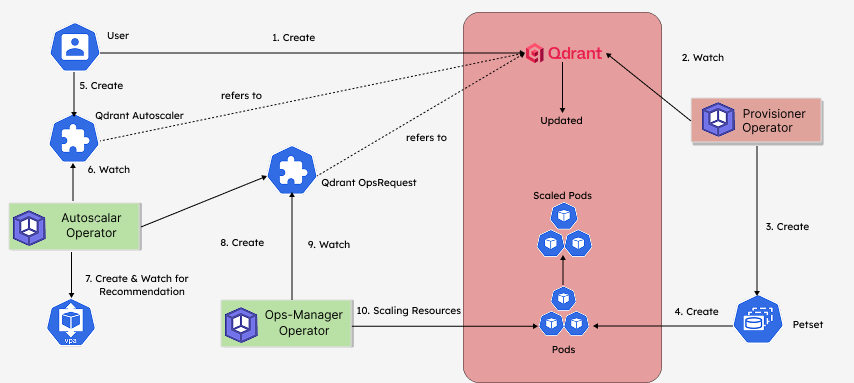
The following diagram shows how KubeDB Autoscaler operator autoscales the resources of Qdrant database components. Open the image in a new tab to see the enlarged version.
The Auto Scaling process consists of the following steps:
At first, a user creates a
QdrantCustom Resource Object (CRO).KubeDBProvisioner operator watches theQdrantCRO.When the operator finds a
QdrantCRO, it createsPetSetand related necessary stuff like secrets, services, etc.Then, in order to set up autoscaling of the
Qdrantdatabase the user creates aQdrantAutoscalerCRO with desired configuration.KubeDBAutoscaler operator watches theQdrantAutoscalerCRO.KubeDBAutoscaler operator generates recommendation using the modified version of kubernetes official recommender for different components of the database, as specified in theQdrantAutoscalerCRO.If the generated recommendation doesn’t match the current resources of the database, then
KubeDBAutoscaler operator creates aQdrantOpsRequestCRO to scale the database to match the recommendation generated.KubeDBOps-manager operator watches theQdrantOpsRequestCRO.Then the
KubeDBOps-manager operator will scale the database component vertically as specified on theQdrantOpsRequestCRO.
In the next docs, we are going to show a step-by-step guide on Autoscaling of various Qdrant database using QdrantAutoscaler CRD.