









































New to KubeDB? Please start here.
Qdrant TLS Encryption
Prerequisite: To configure TLS/SSL in Qdrant, KubeDB uses cert-manager to issue certificates. So first you have to make sure that the cluster has cert-manager installed. Install cert-manager in your cluster following steps here.
To issue a certificate, the following CRDs of cert-manager are used:
Issuer/ClusterIssuer: Issuers and ClusterIssuers represent certificate authorities (CAs) that are able to generate signed certificates by honoring certificate signing requests. All cert-manager certificates require a referenced issuer that is in a ready condition to attempt to honor the request. You can learn more details here.Certificate: cert-manager has the concept of Certificates that define a desired x509 certificate which will be renewed and kept up to date. You can learn more details here.
Qdrant CRD Specification:
KubeDB uses the following CRD fields to enable TLS/SSL encryption in Qdrant.
spec:tls:issuerRefcertificatesclientp2p
Read about the fields in detail from the Qdrant Concepts page.
KubeDB uses the Issuer or ClusterIssuer referenced in the tls.issuerRef field, and the certificate specs provided in tls.certificates to generate certificate secrets. These certificate secrets including ca.crt, server.crt, tls.key, etc. are used to configure the Qdrant server.
Here,
issuerRefis a reference to theIssuerorClusterIssuerCR of cert-manager that will be used byKubeDBto generate necessary certificates.apiGroupis the group name of the resource that is being referenced. Currently, the only supported value iscert-manager.io.kindis the type of resource that is being referenced.KubeDBsupports bothIssuerandClusterIssueras values for this field.nameis the name of the resource (IssuerorClusterIssuer) being referenced.
certificates(optional) is a list of additional certificates used to configure the Qdrant server. You can specify customdnsNames,ipAddresses, andsubjectfor server certificates.client(optional, defaultfalse) enables TLS for client-to-server communication. When set totrue, the Qdrant server will accept TLS-encrypted connections from clients.p2p(optional, defaultfalse) enables TLS for peer-to-peer communication between Qdrant nodes. When set totrue, inter-node communication within the Qdrant cluster will be encrypted using TLS.
How TLS/SSL Configures in Qdrant
The following figure shows how KubeDB configures TLS/SSL in Qdrant. Open the image in a new tab to see the enlarged version.
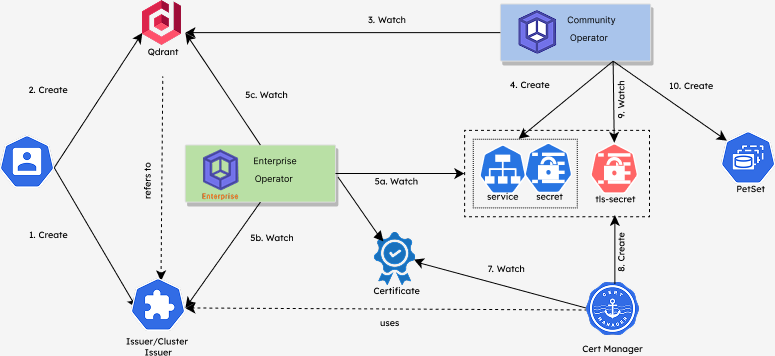
Deploying Qdrant with TLS/SSL configuration process consists of the following steps:
At first, a user creates a
Issuer/ClusterIssuerCR.Then the user creates a
QdrantCR which refers to theIssuer/ClusterIssuerCR that the user created in the previous step.KubeDB-Provisioneroperator watches for theQdrantCR.When it finds one, it creates
Secret,Service, etc. for theQdrant.KubeDBOps-manager operator watches forQdrant(5c),Issuer/ClusterIssuer(5b),SecretandService(5a).When it finds all the resources (
Qdrant,Issuer/ClusterIssuer,Secret,Service), it createsCertificatesby usingtls.issuerRefandtls.certificatesfield specification fromQdrantCR.cert-managerwatches for certificates.When it finds one, it creates certificate secrets
tls-secrets(server, client secrets, etc.) that hold the actual certificates signed by the CA.KubeDB-Provisioneroperator watches for the certificate secretstls-secrets.When it finds all the tls-secrets, it creates the related
PetSetso that the Qdrant database can be configured with TLS/SSL.
In the next doc, we are going to show a step-by-step guide on how to configure a Qdrant database with TLS/SSL.