










































New to KubeDB? Please start here.
Qdrant Volume Expansion
This guide will give an overview of how KubeDB Ops-manager expands the volume of a Qdrant database.
Before You Begin
- You should be familiar with the following
KubeDBconcepts:
How Volume Expansion Process Works
The following diagram shows how KubeDB Ops Manager expand the volumes of Qdrant database components. Open the image in a new tab to see the enlarged version.
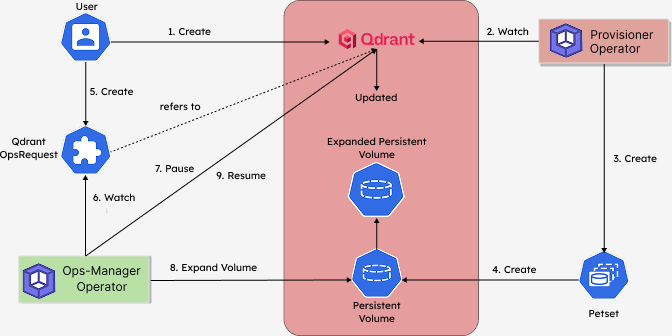
The Volume Expansion process consists of the following steps:
At first, a user creates a
QdrantCustom Resource (CR).KubeDB-Provisioneroperator watches theQdrantCR.When the operator finds a
QdrantCR, it creates aPetsetand related necessary stuff like pods, PVCs, secrets, services, etc.Each Petset creates a Persistent Volume according to the volume claim template. This Persistent Volume will be expanded by the
KubeDBOps-manager operator.Then, in order to expand the volume of the
Qdrantdatabase, the user creates aQdrantOpsRequestCR with the desired new storage size.KubeDBOps-manager operator watches theQdrantOpsRequestCR.When it finds a
QdrantOpsRequestCR, it pauses theQdrantobject so that theKubeDB-Provisioneroperator doesn’t perform any operations on theQdrantduring the volume expansion process.Then the
KubeDBOps-manager operator expands the persistent volumes to the expected size defined in theQdrantOpsRequestCR.After the successful expansion of the volumes, the
KubeDBOps-manager updates the new volume size in theQdrantobject to reflect the updated state.After the successful Volume Expansion, the
KubeDBOps-manager resumes theQdrantobject so that theKubeDB-Provisionerresumes its usual operations.
In the next doc, we are going to show a step-by-step guide on Volume Expansion of a Qdrant database using QdrantOpsRequest CRD.